Your website is your digital storefront. It works while you sleep, attracts customers on demand, and establishes credibility in seconds. But creating a professional website that converts visitors into customers requires more than picking colors and fonts.
This guide walks you through every step of designing a website that looks great, functions properly, and drives results for your business.
Define Your Website Purpose First
- Before touching design tools, answer this question:
- What will this website do for my business?
- Are you selling products online?
- Providing services and bookings?
- Building your portfolio?
- Capturing leads?
- Sharing your expertise?
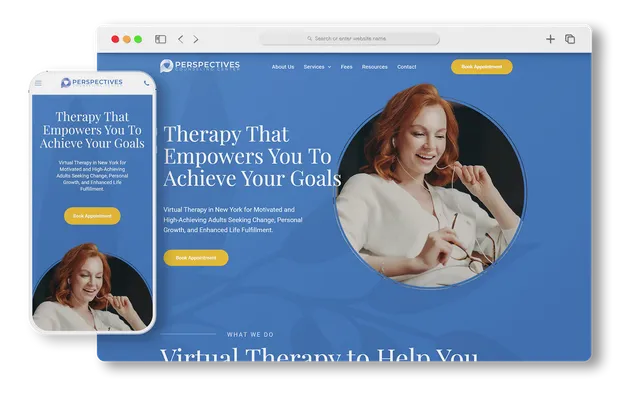
Your purpose dictates everything else. An online store needs product pages, checkout systems, and payment processing. A service business needs a booking page and testimonials. A portfolio needs image galleries and project descriptions.
Spend time getting this right. It saves countless redesigns later.
Understand Your Target Audience
Who visits your website? What problems do they solve? What age group, income level, and tech-savviness do they have?
A design for luxury real estate clients looks different from one for college students starting a side business. The color palette, typography, imagery, and copy all change based on who you’re speaking to.
Research your audience. Look at the competitor websites they visit. Notice what appeals to them and what doesn’t. This research informs every design decision moving forward.
Choose the Right Website Building Platform
You have several paths forward. Each has tradeoffs in control, ease of use, and pricing.
Website builders like Wix, Squarespace, and Weebly offer drag-and-drop simplicity. No coding required. You own fewer of the technical details, but you launch faster. These platforms handle hosting, security updates, and backups automatically.
WordPress gives you more control and flexibility. You install it on your own hosting. You manage themes and plugins. You can customize nearly everything. The tradeoff is a steeper learning curve and more maintenance responsibility.
Custom development means hiring a team to build exactly what you need. This costs more but gives you maximum flexibility and performance. This route makes sense for large projects with specific requirements.
For most small businesses, website builders offer the best balance between ease of use and capability. For growing businesses needing more flexibility, WordPress with a visual builder like Elementor bridges the gap.
Pick a Professional Domain Name
Your domain is your address on the internet. It’s the first thing people type to find you.
Keep it simple and memorable. Short names are easier to type and share verbally. Use your business name if available. Include location for local services (like “plumbingservices-denver.com”). Avoid numbers and special characters that confuse people.
Avoid trendy domain extensions unless they fit your brand. A .com domain still carries the most trust and authority.
Register your domain through providers like Namecheap, GoDaddy, or Google Domains. These also offer email hosting, so your business email matches your domain.
Select a Responsive Template
Templates provide your foundation. Choose one designed for your industry and use case.
Make sure it’s responsive, meaning it automatically adapts to phones, tablets, and desktops. Mobile-first indexing means Google ranks your mobile version first. A non-responsive site loses rankings and customers.
Look for templates that are lightweight and fast. A bloated template slows your site. Slower sites rank lower and lose visitors.
Check that the template includes the pages you need. Most include homepage, about, services or products, blog, and contact. Make sure it fits your structure.
Set Your Brand Colors and Fonts
Colors communicate emotion and personality. Choose two primary colors that make up most of your design. Add one accent color for buttons and important elements.
Psychology matters. Blue signals trust and professionalism, perfect for financial advisors or consulting firms. Green suggests health and sustainability, ideal for organic or environmental businesses.
Warm colors like orange and brown create coziness, working well for coffee shops and bakeries.
Typography affects readability and perception. Pick one font for headings and another for body text. Sans-serif fonts like Helvetica and Inter look modern and clean. Serif fonts like Garamond feel traditional and elegant.
Use Google Fonts for free, web-safe options. Avoid using more than three fonts total. Consistency in typography strengthens your brand.
Create an Intuitive Site Structure
Your website structure determines how visitors navigate and find information.
Plan your essential pages:
- Home page with a clear value proposition and call to action. About page telling your story and why customers should trust you. Product or service pages showcasing what you offer. Contact or booking page, making it easy to get in touch. A blog for sharing expertise and improving SEO. Footer with social media links and essential information.
- Organize these logically so visitors find what they need in two clicks. Confusing navigation sends people to competitors.
- Use breadcrumbs and clear labels. Create a visual hierarchy where the most important information stands out.
Write Compelling Headlines and Copy
Your copy sells. It explains your value and convinces visitors to take action.
- Headlines grab attention and answer the visitor’s main question immediately. “Affordable responsive website templates for small businesses” works better than “Templates.”
- Body copy speaks directly to the reader’s needs. Use “you” and “your” frequently. Explain benefits, not just features. Show how you solve their problems.
- Keep paragraphs short. Use subheadings frequently. White space makes text less intimidating. Most visitors scan instead of reading word-for-word.
- Your tone matters. Are you formal and professional? Friendly and casual? Consistent voice builds trust.
Optimize Page Speed and Performance
- Speed influences rankings and conversions. Slow sites lose visitors and sales.
- Compress images without sacrificing quality. Large image files affect tank performance. Use tools to resize and optimize before uploading.
- Minimize code bloat. Unnecessary plugins and scripts slow everything down. Only use what you need.
- Enable caching so repeat visitors load pages faster. Most website builders handle this automatically.
- Test your speed with Google PageSpeed Insights. Aim for scores above 80. Anything below 50 needs immediate attention.
- Mobile optimization is non-negotiable. More people browse on phones than on desktops. Your site must work perfectly on all screen sizes.
Implement Basic SEO
- You need organic search traffic. SEO starts during design, not after launch.
- Put your main keyword in your page title and meta description. Keep titles under 60 characters. Meta descriptions under 155 characters. These appear in search results and influence clicks.
- Use heading tags correctly. One H1 per page. H2 and H3 for subsections. Include keywords naturally. Don’t stuff keywords unnaturally.
- Write unique content for each page. Duplicate content confuses search engines. Create content around long-tail keywords with lower competition like “best web design strategies for small businesses” or “affordable responsive website templates for startups.”
- Build internal links between related pages. This helps Google understand your site structure and spreads ranking authority.
- Add alt text to images. Describe what the image shows. This helps search engines and improves accessibility.
- Include a blog. Fresh content signals activity to search engines. Blog posts targeting specific keywords drive ongoing traffic.
Integrate Analytics and Tracking
You can’t improve what you don’t measure.
- Add Google Analytics to track visitor behavior. See where traffic comes from, how long people stay, and which pages convert.
- Set up Google Search Console. Monitor how Google sees your site. Fix crawl errors. See which keywords bring traffic.
- Add conversion tracking. Set up goals for form submissions, purchases, or contact requests. Know your return on investment.
- Review analytics monthly. Use data to guide improvements. Update content that isn’t performing. Double down on what works.
Add Trust Signals and Social Proof
- Visitors need confidence before buying or contacting you.
- Display customer testimonials with photos and names. Real testimonials beat generic praise.
- Show credentials and certifications. Explain your experience and expertise.
- Include trust badges for security or industry affiliations.
- Display client logos if you work with recognizable names.
- Add a privacy policy and clear contact information. These signal legitimacy.
Test Functionality on All Devices
- Before launching, test everywhere.
- Check how your site looks on iPhones, Android phones, tablets, and desktops. Test on different browsers like Chrome, Firefox, and Safari.
- Test all forms. Make sure the submit buttons work. Verify confirmation emails arrive.
- Test internal links. Click every link and make sure nothing breaks.
- Test on different internet speeds. Slow connections reveal performance problems.
- Have friends and family navigate your site. Watch where they click. Notice what confuses them.
- These tests catch problems before customers see them.
How Bilal Web Studio Helps You Design Professional Websites
Building a professional website requires skills in design, development, SEO, and user experience. You could spend weeks learning tools and troubleshooting problems. Or you could work with Bilal Web Studio.
Bilal Web Studio specializes in creating professional websites that convert visitors into customers. Here’s what they provide:
Custom Website Design
Every business is unique. Bilal Web Studio doesn’t use one-size-fits-all templates. They design sites specifically for your goals, audience, and brand.
Their design process starts with understanding your business, competitors, and target customers. They create custom designs reflecting your brand personality while following modern design best practices.
The result is a professional website that stands apart from cookie-cutter designs.
Professional Development
Good design means nothing if the site doesn’t work. Bilal Web Studio builds responsive websites that perform flawlessly on every device.
They optimize code for speed. They implement proper security. They ensure your website loads fast, even for visitors with slow connections.
Whether you need a WordPress site, custom development, or a platform-specific solution, they handle the technical details so you focus on your business.
SEO Optimization
A beautiful website doesn’t matter if nobody finds it. Bilal Web Studio builds SEO directly into your site architecture.
They research keywords relevant to your business and audience. They optimize your content, meta tags, and site structure for search engines.
Long-tail keywords with lower competition get special attention. These keywords drive highly targeted traffic and convert better than generic terms.
They help you understand your analytics and make data-driven improvements over time.
Mobile-First Design
Over half of web traffic comes from mobile devices. Bilal Web Studio designs for mobile first, then scales up to larger screens.
Your site works perfectly on iPhones, Android devices, tablets, and desktops. Loading speed optimizes for mobile users on slower connections.
This mobile-first approach improves your Google rankings and user experience.
Local SEO for Service Businesses
If you serve a specific area, local SEO matters. Bilal Web Studio optimizes your website for local search.
They set up Google My Business optimization. They build location-specific content. They help you rank for searches like “web design company in [your city].”
Customers looking for services near them find you first.
Content Strategy
Beautiful design without good content doesn’t convert. Bilal Web Studio helps develop content that sells.
They write compelling headlines, benefit-focused copy, and calls to action that move visitors forward.
They plan content calendars for blogs. They help you explain your value in ways that resonate with your audience.
They ensure your website tells a cohesive story that builds trust and authority.
Ongoing Support and Maintenance
Your website needs updates and improvements over time. Bilal Web Studio provides ongoing support.
They handle security updates, backups, and performance monitoring. They fix problems quickly. They implement improvements based on your analytics.
You get a partner focused on your website’s success, not just a one-time project.
Get Started Building Your Professional Website Today
A professional website is one of the best investments for your business. It works 24/7, generates leads, establishes authority, and levels the playing field with larger competitors.
Whether you want to learn to design it yourself or partner with professionals, the time to start is now.
If you want expert guidance from experienced professionals, Bilal Web Studio offers free consultations. They’ll review your current situation, discuss your goals, and show you exactly what a professional website could do for your business.
Your competitors are already online. Your customers are searching for solutions right now. The question is simple: Will they find you?
Contact Bilal Web Studio today and build the professional website your business deserves.